Contents
Why Is My Internet Slow at Night? How Peak-Hour Congestion Works
Overseas sites load instantly in the afternoon, then spin and drop video quality every evening? The cause is usually not your home broadband but the shared long-distance links behind it. Explained with a rush-hour bridge analogy — queues, packet loss and how TCP slows down — with a sequence diagram, a back-of-the-envelope table and what you can do about it.
How networks work — series: ① What happens when you open a website → ② Network layers → ③ Common network protocols → ④ What is a proxy? → ⑤ What is a VPN? → ⑥ VPN vs proxy → ⑦ What HTTPS encrypts → ⑧ System proxy vs TUN mode → ⑨ Split tunneling → ⑩ DNS poisoning and leaks → ⑪ Why it slows down at night → ⑫ Latency, loss and bandwidth
When your internet slows down every evening, it’s usually not your home broadband — it’s the shared long-distance links behind it filling up. During the day there’s spare capacity; from about 8 pm to midnight everyone is home streaming, gaming and downloading at the same time, and demand outgrows the link. Routers can’t forward fast enough, so packets start queueing, and once the queue is full they get dropped. TCP, which web pages and video rely on, slows itself down as soon as it sees loss — and the farther away the site, the slower it recovers. That’s why things feel instant in the afternoon and spin at night.
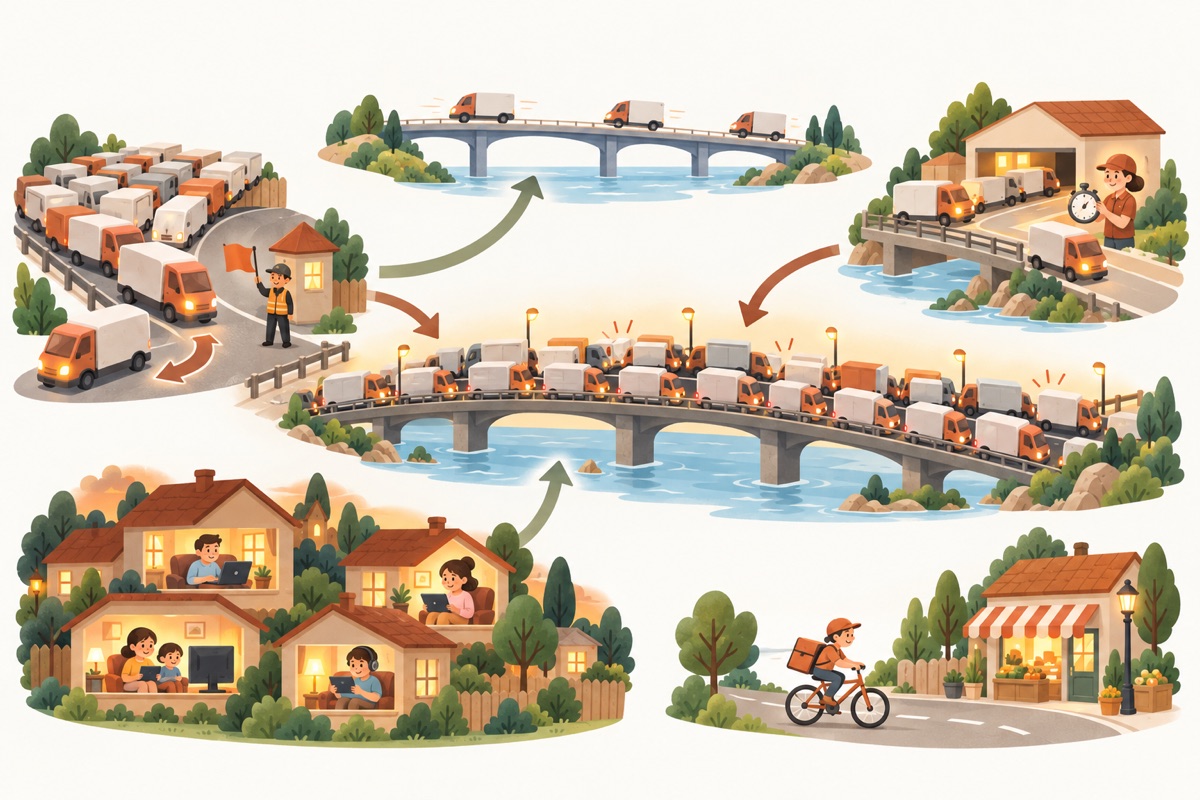
- ① Everyone online at onceEvening streaming and browsing
- ② A bridge with fixed lanesThe shared long-distance link fills up
- ③ Lot full, vans turned awayThe router's buffer is full; packets drop
- ④ Dispatcher slows downTCP sees loss and halves its rate
- ⑤ A quiet express bridgeA premium route with spare capacity
- ⑥ Local street, no trafficLocal sites go direct, unaffected
Picture a bridge at rush hour
Think of the long-distance link as a bridge between two shores, and the data you send and receive as delivery vans crossing it:
| Rush hour in town | On the network |
|---|---|
| Everyone gets home and starts shopping and shipping at once | Everyone streams and browses in the evening |
| A bridge with a fixed number of lanes | A long-distance link with fixed bandwidth |
| The waiting lot at the bridge is full; an officer turns new vans away | The router’s buffer is full; new packets are dropped |
| The dispatcher on the far shore notices missing vans and sends them out more slowly | The sender notices loss and TCP lowers its sending rate |
| A pricier express bridge with little traffic | A premium (optimized) route that keeps spare capacity even at peak |
| A local street in town with no traffic | Local sites connected directly, never crossing the long-distance link |
However wide the road outside your house (gigabit broadband), it only decides how fast vans reach the bridge. Whether the bridge is jammed depends on how many lanes it has and how many vans are on it right now.
Why evenings: shared bandwidth
The broadband you pay for only covers the stretch from your home to your ISP. Beyond that, everyone’s traffic converges onto a handful of long-distance links, and those links are shared.
ISPs don’t build links for “everyone at full speed at once” — that would be very expensive and mostly idle. Links are sized for typical usage plus some headroom. During the day people are at work or school and there’s capacity to spare; in the evening, video, games and software updates can push demand several times higher, and anything above capacity has to queue.
That’s also why the same site is often much faster at 2 am than at 9 pm: same link, fewer vans.
Queueing and packet loss: when a router can’t keep up
Every router has a buffer to hold packets it can’t forward yet — the waiting lot at the bridge:
- Congestion starts: packets wait in the buffer for their turn. You notice higher latency — pages take a moment longer, games start to lag.
- The buffer fills up: there’s nowhere to put new packets, so the router simply drops them. That’s packet loss. Dropped data has to be sent again by the sender, costing another round trip.
So the classic peak-hour symptoms come together: higher latency and more packet loss. Latency alone might only go from 150 ms to 250 ms; what really kills the speed is the loss.
Why a little loss slows TCP down so much
Web pages, video and downloads mostly use TCP (see common network protocols). TCP doesn’t start at full speed; it probes. Each round of acknowledgements lets it send a bit more, and the moment it sees loss it assumes the path is congested, cuts its sending rate in half, and slowly ramps up again. This is congestion control, and it exists so everyone backs off instead of jamming the link completely.
The sequence diagram below walks through a transfer at peak hours:
| Step | What happens |
|---|---|
| ①–③ Start | The server sends a little, gets acknowledgements, and doubles up — faster and faster |
| ④–⑥ The queue fills | It keeps sending more; a router on the long-distance link has a full buffer and drops some packets, so only some arrive |
| ⑦ A gap is noticed | Your device received data with a hole in it and keeps saying “I’m still waiting for this one”, so the server learns a packet was lost |
| ⑧ Slow down | The server assumes congestion and halves its sending rate |
| ⑨–⑩ Resend and recover | It resends the lost data and ramps up again from half |
The key point: how fast TCP recovers depends on the round-trip time. It can only add a little per round, and a round is one round trip. Reaching a distant site often takes 150–200 ms per round trip — several times more than a local site — so the same loss rate costs much more speed and takes longer to recover from.
A common rule of thumb shows the scale. A single TCP connection tops out at roughly:
speed ≈ (packet size ÷ round-trip time) × 1.22 ÷ √(loss rate)With packets of about 1,460 bytes:
| Round-trip time | 0.01% loss (quiet link) | 1% loss (peak hours) |
|---|---|---|
| 30 ms (local site) | about 47 Mbps | about 4.7 Mbps |
| 180 ms (long distance) | about 7.9 Mbps | about 0.8 Mbps |
Going from one-in-ten-thousand to one-in-a-hundred loss cuts a single connection to a tenth of its speed; add a long round trip and “fine for HD video” becomes “pages are spinning”. It’s only a rough estimate — newer congestion-control algorithms such as BBR are less sensitive to loss, and browsers open several connections at once — but the reason evenings feel slow is the same.
Not all routes are equal
Two routes to the same far-away place can behave very differently at peak hours:
- Standard routes: cheap and crowded, the first to fill up at night; loss can reach several percent or more.
- Premium (optimized) routes: more expensive, fewer users and more headroom, so latency and loss stay much steadier at peak.
- Detours: sometimes packets don’t go straight there but via another region first, which stretches the round trip and adds more places to get stuck.
Which route you get depends on your ISP, the data center hosting the site (or the VPN server) and how the two networks connect. That’s why switching servers sometimes helps immediately: servers in different data centers reach you over different routes.
What you can do
First find out where the slowdown is: open a local site and an overseas site side by side.
- Local sites are slow too: the problem is your own network, not the long-distance link. Check your Wi-Fi signal (move closer to the router or use a cable), restart the router, and see whether someone at home is downloading or streaming in 4K.
- Only overseas sites are slow: the long-distance link is congested. You can:
- Switch servers: servers in different regions use different routes, and which one is clearer at night varies — try a few. The lowest-latency server isn’t always the fastest in the evening; packet loss matters too.
- Send local sites direct: with split tunneling, local sites skip the VPN server, so long-distance congestion doesn’t affect them and they don’t use up the tunnel (see split tunneling explained).
- Schedule big downloads off-peak: system updates, large games and cloud sync can run overnight or during the day, leaving evenings for latency-sensitive browsing and video.
- Let video pick its quality: automatic quality stalls far less at peak hours than forcing the highest resolution.
How Pangolin handles peak hours
- Smart select: on by default, it picks the lowest-latency server for your current network, and switches automatically if a server runs into trouble (see Connecting and switching servers).
- Real latency measurements: the latency on the Connect screen is the round-trip time of a real request through the encrypted tunnel, so it reflects the route you’re actually on, not just the distance to the server.
- Smart routing: local sites go direct by default instead of detouring abroad, so they stay fast at peak hours.
- Published measurements: we test every route from home broadband connections on several ISPs every 15 minutes and publish the results, including latency, on the service status page. When evenings get slow, a quick look there tells you whether the whole route is affected or just your own network.
If evenings stay noticeably slow, try another server first; if it keeps happening, send feedback using the steps in Troubleshooting and include the time of day and the server you used, so we can look into the route.
Related reading
FAQ
I have gigabit broadband. Why are overseas sites still slow at night?
Your gigabit plan only covers the stretch from your home to your ISP. Reaching an overseas site also crosses long-distance links that many customers share, and when those fill up in the evening, even the fastest home connection has to wait in line. Upgrading your plan won't fix this kind of slowdown.
Why does a speed test look fast when web pages are slow?
Speed tests usually connect to a server close to you, so they measure only the local stretch, and they open many connections at once, which averages out the effect of packet loss. Loading an overseas page goes over the long-distance link on connections that are very sensitive to loss, so the two can be wildly different.
I switched servers and it's still slow. What now?
Open a local website at the same time. If local sites are slow too, the problem is your own network (Wi-Fi signal, router, someone downloading at home) and switching servers won't help. If only overseas sites are slow, try a server in a different region — different servers take different routes and are congested to different degrees at peak hours.
Does mobile data slow down at night too?
It can, for a different reason. The cell tower near you is also shared, so it slows down when many people use it; overseas sites add long-distance congestion on top. Try once on Wi-Fi and once on mobile data to see which stretch is slow.
Don't have Pangolin yet?
Available for iPhone / iPad, Mac, Windows and Android. New accounts get a free 7-day Pro trial.
Download the app