Contents
Split Tunneling Explained: Why Local Websites Should Connect Directly
Once you're connected to a VPN, not all traffic should take the long way round. Split tunneling checks each connection against an ordered list of rules and sends it direct, through the tunnel, or blocks it. Explained with a post-office sorting desk analogy and a step-by-step sequence diagram.
How networks work — series: ① What happens when you open a website → ② Network layers → ③ Common network protocols → ④ What is a proxy? → ⑤ What is a VPN? → ⑥ VPN vs proxy → ⑦ What HTTPS encrypts → ⑧ System proxy vs TUN mode → ⑨ Split tunneling → ⑩ DNS poisoning and leaks → ⑪ Why it slows down at night → ⑫ Latency, loss and bandwidth
Split tunneling means that once you’re connected to a VPN, each connection is routed by its destination: direct, through the encrypted tunnel, or blocked. It isn’t a single switch but an ordered list of rules checked from top to bottom — local websites go direct, overseas services go through the tunnel, and ad and tracking domains are dropped.
The previous article, System proxy vs TUN mode, covered how traffic gets captured. This one covers what happens next: how every packet gets sorted onto the right road.
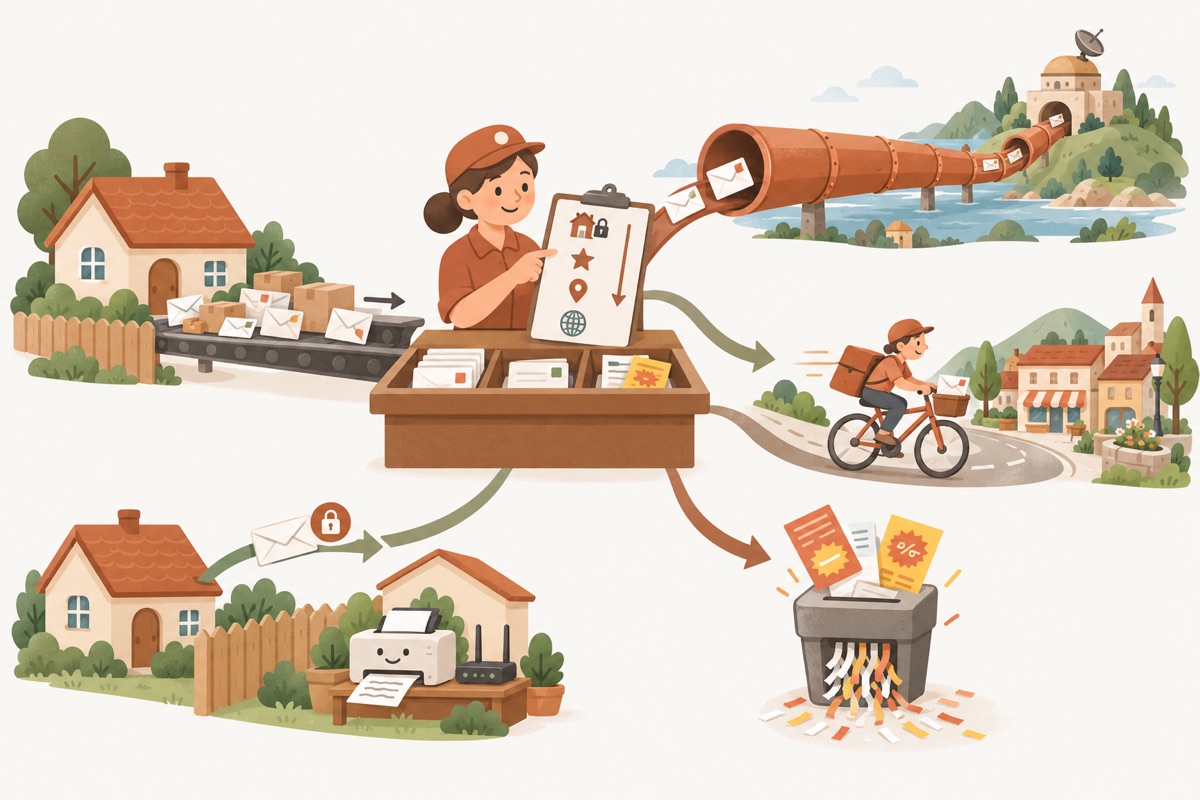
- ① All mail reaches one deskTUN mode captures all traffic
- ② Checklist, top to bottomThe first match is followed
- ③ Letters abroadSealed pipe: the tunnel
- ④ Local lettersBicycle courier: direct
- ⑤ Junk flyersShredder: blocked
- ⑥ Letters to the neighboursLAN direct, a fixed rule
An analogy: the post-office sorting desk
Imagine every letter leaving your house goes to the same sorting desk first:
- All mail arrives at one desk. TUN mode captures traffic from every program on the device, like all letters riding the same conveyor belt.
- The clerk reads a checklist from top to bottom. Each line says “this kind of letter → this route”, and the first line that fits is the one that’s followed — the rest are ignored.
- Letters going abroad are sealed into a pipe and sent to a distant relay station, which delivers them. That’s going through the tunnel.
- Local letters go to a bicycle courier and arrive within minutes. That’s going direct.
- Junk flyers go straight into the shredder and are never sent. That’s blocking.
- Letters to the neighbours (your printer and router) are handed over the fence. This line is fixed at the very top of the list and can’t be changed.
Without a sorting desk you’d only have two choices: send every letter abroad (global mode) or send nothing encrypted (VPN off). Split tunneling gives every letter the most sensible route.
Three destinations
| Route | What happens | Typical use |
|---|---|---|
| Direct | Sent from your own network straight to the site, bypassing the VPN server | Local shopping, video, banking and map sites; devices on your LAN |
| Tunnel | Encrypted and sent to the server, which visits the site for you | Overseas services that are blocked or slow on your local network |
| Block | Dropped; nothing is sent | Ads, trackers, malicious domains |
Why local websites should connect directly
1. Speed: no detour
A direct connection to a local site only travels a short distance — usually a 10–30 ms round trip. Through the tunnel, data first goes to an overseas server, which then reaches back to the local site, and the reply retraces the same path. That’s two extra cross-border trips, often adding 100 ms or more to every request. Every image and API call on the page pays that cost.
Many local sites also use a CDN (content delivery network) that serves you from the nearest data centre. Through the tunnel, the site sees the overseas server’s address and may serve you from a distant data centre or a slower route.
2. No wasted data
Video, downloads and software updates from local sites work fine directly. Direct traffic never touches the VPN server, so it doesn’t use your daily data and doesn’t compete with other users for server bandwidth.
3. Fewer security checks
Banking, payment and shopping sites watch where you sign in from. Jumping between a local address and an overseas IP easily triggers “unusual sign-in” checks or even temporary account locks. Some video sites also license content for local IPs only and refuse to play it from abroad. Going direct means local sites always see your own network, so none of this happens.
How rules match
Each line on the clerk’s checklist has a type + value + route. There are six common rule types:
| Type | Matches | Example |
|---|---|---|
| Domain | That exact domain only | www.example.com |
| Domain suffix | The domain and all its subdomains | example.com also matches a.example.com |
| Domain keyword | Any domain containing the text | adservice |
| IP range (CIDR) | A block of IP addresses | 203.0.113.0/24 |
| GeoIP | IPs by the region they’re registered to, from public IP databases | ”Local IPs go direct” |
| GeoSite | Websites by category, from community-maintained domain lists | ”Common local sites go direct” |
The first four are precise rules you write yourself. The last two are ready-made rule sets, each covering thousands of domains or IP ranges — “local sites go direct” is usually built from these two.
Why both domain rules and IP rules
Rules are checked the moment a packet reaches the client. At that point the client always knows the destination IP, but not necessarily the domain — some apps connect by IP, or the domain was resolved somewhere else. So:
- IP rules (IP range, GeoIP) always work and make a good safety net;
- Domain rules (domain, suffix, keyword, GeoSite) are easier to read, but the client needs to know which domain the connection is for. It usually finds out in one of two ways: by handling DNS queries itself and remembering which IP came from which domain, or by reading the plaintext site name from the TLS handshake (SNI — see What HTTPS encrypts).
How the DNS queries themselves are routed is also part of split tunneling — the next article, DNS poisoning and DNS leaks, covers it in detail.
Rule order: first match wins
The list is ordered. It’s checked from the top and stops at the first match, so when a site matches several rules, only the highest one counts.
Say you want docs.example.com direct but the rest of example.com through the tunnel:
✅ Right order
- Domain
docs.example.com→ Direct - Domain suffix
example.com→ Tunnel
Result: docs.example.com matches rule 1 and goes direct; other subdomains match rule 2 and go through the tunnel.
❌ Wrong order
- Domain suffix
example.com→ Tunnel - Domain
docs.example.com→ Direct
Result: docs.example.com matches rule 1 first, so rule 2 is never used.
Rule of thumb: the more specific the rule, the higher it goes. Broad rules (rule sets, large IP ranges) go lower, and a final rule at the bottom decides what happens when nothing else matched — tunnel or direct.
Sequence diagram: three requests, three routes
| Step | What happens |
|---|---|
| ①–② | A program opens a local site. The virtual adapter hands the packet to the client, which checks the rules and matches “local sites direct” |
| ③–④ | The client sends it out through the real network adapter, and the site replies directly — the VPN server is never involved |
| ⑤–⑥ | A program opens an overseas service. No rule above matches, so the final rule applies: tunnel |
| ⑦–⑩ | The client encrypts the request to the server, the server visits the site, and the reply comes back encrypted |
| ⑪–⑫ | A program requests an ad domain. It matches a block rule, so the client refuses it and nothing leaves the device |
How Pangolin orders its rules
Pangolin uses Smart routing by default, with four layers from top to bottom:
- System rules: LAN and private addresses go direct (router admin page, printers, NAS), and DNS queries are handled by the client. Always on top; can’t be turned off.
- My rules: rules you add yourself, checked in list order.
- Local direct: common local sites and local IPs go direct (GeoSite + GeoIP rule sets). Can be turned off.
- Final rule: anything that matched nothing above goes through the tunnel.
Rules are saved to your account and sync to every device you sign in on. If you’re connected when you change them, the app reconnects once and the new rules apply immediately. See Custom routing rules for how to add, reorder and delete rules.
Related reading
- Previous: System proxy vs TUN mode
- Next: DNS poisoning and DNS leaks
- Custom routing rules
FAQ
Should I use split routing or global mode?
Use split routing for everyday browsing (Pangolin calls it Smart routing). Global mode sends everything through an overseas server, which slows down local sites and can trigger security checks. Keep it for troubleshooting.
Does direct traffic count toward my data allowance?
No. Direct traffic goes from your own network straight to the website without touching the VPN server, so it isn't counted in your daily data.
Why isn't my domain rule working?
Usually a rule higher up the list matched first. Rules are checked top to bottom and the first match wins, so drag the more specific rule above the broader one. Also check that the mode is Smart routing — Global and Direct modes ignore custom rules.
Can local websites tell I'm using a VPN when traffic goes direct?
No. Direct traffic is exactly what it would be without the VPN, so local sites just see your own network. That's one of the reasons local sites should go direct.
Don't have Pangolin yet?
Available for iPhone / iPad, Mac, Windows and Android. New accounts get a free 7-day Pro trial.
Download the app