Contents
What Is a Proxy? Forward, Reverse and SOCKS5
A proxy is a middleman that forwards network requests for you. Learn the difference between forward and reverse proxies, which layer HTTP and SOCKS5 proxies work at, what a proxy can and can't see — with three sequence diagrams of how they work.
How networks work — series: ① What happens when you open a website → ② Network layers → ③ Common network protocols → ④ What is a proxy? → ⑤ What is a VPN? → ⑥ VPN vs proxy → ⑦ What HTTPS encrypts → ⑧ System proxy vs TUN mode → ⑨ Split tunneling → ⑩ DNS poisoning and leaks → ⑪ Why it slows down at night → ⑫ Latency, loss and bandwidth
A proxy is a middleman that forwards network requests for you: instead of contacting a site directly, you hand your request to the proxy, it contacts the site, and it passes the result back. Proxies come in two kinds depending on who they work for: a forward proxy works for users (a company’s internet gateway, for example), and a reverse proxy works for websites (CDNs, Nginx). The common proxy protocols — HTTP proxies and SOCKS5 — don’t encrypt anything on their own, which is one of the biggest differences between a proxy and a VPN.
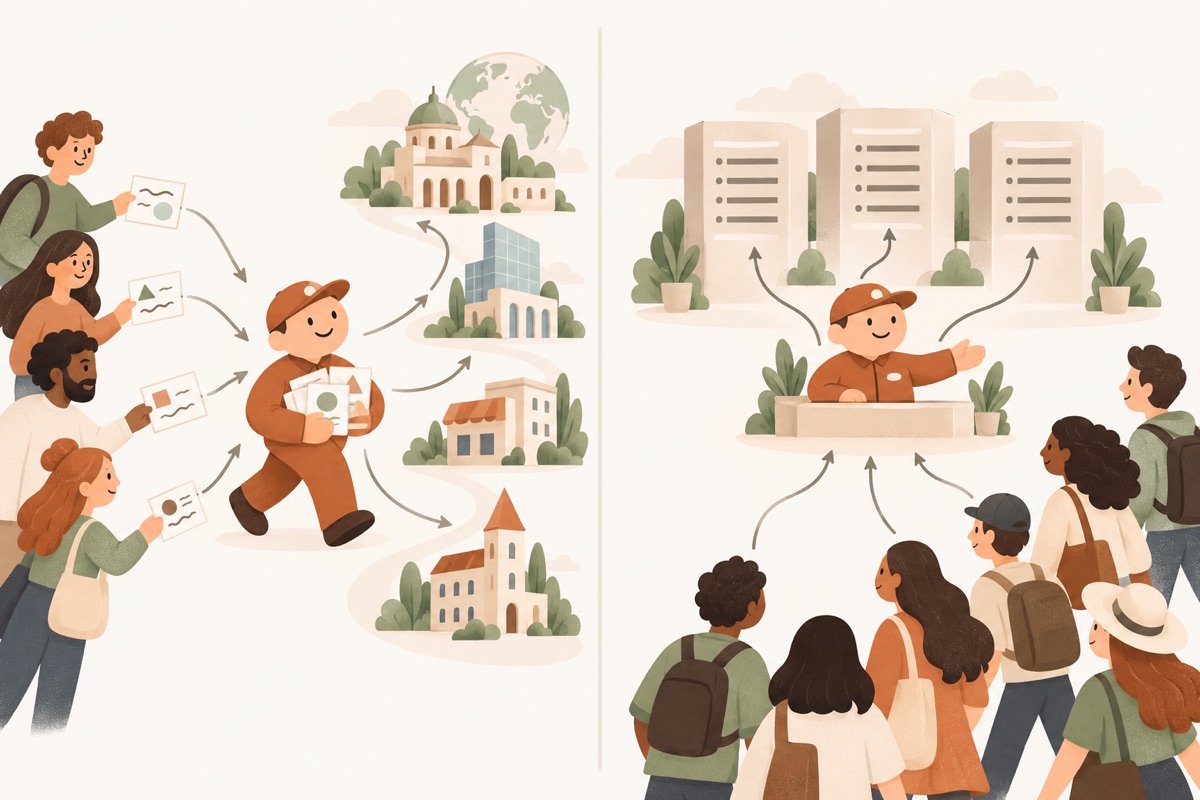
- ① UsersHand their requests to the forward proxy
- ② Forward proxyGoes out to websites on the users' behalf
- ③ WebsitesSee only the proxy, not the users behind it
- ④ VisitorsThink they're talking to the website directly
- ⑤ Reverse proxyGreets, routes and caches in front of the site
- ⑥ Origin serversThe real servers, hidden behind the proxy
What a proxy really is: a middleman
Without a proxy, your device talks to the website directly. With one, the conversation is split in two:
- You ↔ proxy: you tell the proxy which site you want;
- Proxy ↔ website: the proxy visits the site as itself, so the site sees the proxy’s IP address, not yours.
Sitting in the middle lets a proxy do a lot — cache popular content, filter access, hide one side’s identity, spread traffic across servers. It also means it can see everything unencrypted that passes through it.
Forward vs reverse proxies
The technology is the same; what differs is which side the proxy stands on and who it serves:
| Forward proxy | Reverse proxy | |
|---|---|---|
| Works for | Users (clients) | Websites (servers) |
| Who knows it’s there | Users configure it themselves | Users usually don’t — they think they’re talking to the site |
| Hides | The user: sites only see the proxy’s IP | The server: visitors only see the proxy, not the origin behind it |
| Typical uses | Company or school internet gateways, access control, caching | CDNs, load balancing, attack protection, central HTTPS certificates |
| Everyday example | The proxy address your office network tells you to enter | Almost every large site you visit goes through a CDN first |
How does a forward proxy handle HTTPS?
Nearly every site uses HTTPS now, so the content is encrypted and the proxy can’t — and doesn’t need to — read it. The browser first uses the CONNECT method to have the proxy open a channel, then the proxy relays the encrypted data untouched:
| Step | What’s happening |
|---|---|
| ① CONNECT | The browser asks the proxy to connect it to port 443 on example.com |
| ② Connect | The proxy opens a TCP connection to the site as itself |
| ③ 200 | The proxy replies “Connection established” — the channel is open |
| ④ TLS handshake | The browser does the TLS handshake directly with the site; the proxy just carries the bytes |
| ⑤–⑥ Encrypted data | Requests and pages from here on are encrypted; the proxy can’t read them, only forward them |
So for HTTPS sites, a forward proxy can see which domain you visited, when, and how much data moved — but not the content. For a plain HTTP site, it sees everything and could even change it.
Reverse proxies: the front desk for a website
When you visit a big website, the machine that greets you usually isn’t the real server (the origin) but a reverse proxy or CDN node standing in front of it:
| Step | What’s happening |
|---|---|
| ①–③ Cache hit | For things that rarely change, like images and stylesheets, the reverse proxy already has a copy and returns it — the origin isn’t involved at all |
| ④–⑤ Cache miss | The request is for something not in the cache |
| ⑥–⑦ Go to origin | The reverse proxy forwards the request to the origin, which builds the page and returns it |
| ⑧ Cache | The proxy stores a copy according to the site’s rules, so the next visitor gets it straight away |
| ⑨ Return | The page goes back to the visitor |
The payoff: visitors get data from a nearby node, so it’s faster; the origin does far less work; and its real address stays hidden, making it harder to attack.
HTTP vs SOCKS5 proxies: which layer they work at
| HTTP proxy | SOCKS5 proxy | |
|---|---|---|
| Layer | Application — it understands HTTP | Session (between application and transport) — doesn’t care what protocol runs on top |
| What it can forward | Mostly web traffic (HTTP, plus HTTPS via CONNECT) | Any TCP connection, plus UDP — email, games, chat apps |
| Encryption | None | None |
| Authentication | Optional username and password | Optional username and password |
SOCKS5 is simple: say hello, authenticate, tell the proxy where to connect, and from then on it just relays:
| Step | What’s happening |
|---|---|
| ①–② Greeting | The program lists the authentication methods it supports; the proxy picks one |
| ③–④ Authentication | The program sends a username and password and the proxy checks them. Note: this is sent in plain text too |
| ⑤ Connect request | The program gives the proxy the target address and port |
| ⑥–⑦ Connect | The proxy connects to the target and reports success |
| ⑧ Relay | From now on the proxy forwards data both ways as-is — no parsing, no encryption |
What a proxy can and can’t do
It can:
- Hide your IP address — sites see the proxy’s address;
- Centralise control — a company can filter and audit staff browsing in one place;
- Speed things up with caching — popular content is served from the proxy;
- Share the load — a reverse proxy spreads visitors across many servers.
It can’t:
- Keep your activity private from the proxy itself — the proxy doesn’t encrypt anything, so unencrypted content is fully visible, and even with HTTPS it sees which domains you visit;
- Stop eavesdropping on the way to the proxy — with a plain HTTP or SOCKS5 proxy, anyone on your network, or your ISP, can see where you’re connecting and even your proxy password;
- Cover your whole device — only programs configured to use the proxy go through it; everything else connects directly.
Those last two are exactly what a VPN solves: it encrypts the entire path between you and the server, and uses a virtual network adapter to capture all of your device’s traffic. The next article covers how.
Related reading
FAQ
I set a proxy in my browser — why do some apps ignore it?
System and browser proxy settings only apply to programs that choose to honour them. Many command-line tools, games and some apps connect directly without reading those settings. To send all of a device's traffic through, you need a virtual network adapter (TUN) — see "What is a VPN?".
Are free public proxies OK to use?
Not for logging in to anything or handling sensitive data. A proxy sits between you and the site and can read anything unencrypted, and an unknown free proxy may log or even tamper with your traffic.
How does a CDN relate to proxies?
A CDN is essentially a huge fleet of reverse proxies around the world. They stand in front of a website, receive visitors on its behalf and cache content, so each visitor is served from a nearby location.
Don't have Pangolin yet?
Available for iPhone / iPad, Mac, Windows and Android. New accounts get a free 7-day Pro trial.
Download the app