Contents
Common Network Protocols Explained: IP, TCP, UDP, DNS, HTTP, TLS, QUIC
The seven protocols you rely on every time you go online — which layer each one lives in and what it does — with three sequence diagrams showing a TCP connection's life, how DNS looks up a name, and why QUIC is faster than TCP + TLS.
How networks work — series: ① What happens when you open a website → ② Network layers → ③ Common network protocols → ④ What is a proxy? → ⑤ What is a VPN? → ⑥ VPN vs proxy → ⑦ What HTTPS encrypts → ⑧ System proxy vs TUN mode → ⑨ Split tunneling → ⑩ DNS poisoning and leaks → ⑪ Why it slows down at night → ⑫ Latency, loss and bandwidth
A protocol is a set of rules two sides agree on in advance: what messages look like, who says what first, and what to do when something goes wrong. Seven of them do most of the work when you’re online: IP gets data to the right machine, TCP and UDP get it to the right program (one reliable, one fast), DNS turns names into IP addresses, HTTP fetches web pages, TLS encrypts them, and QUIC is the newer protocol that combines transport and encryption in one. We’ll go through each, with three sequence diagrams showing how they actually work step by step.
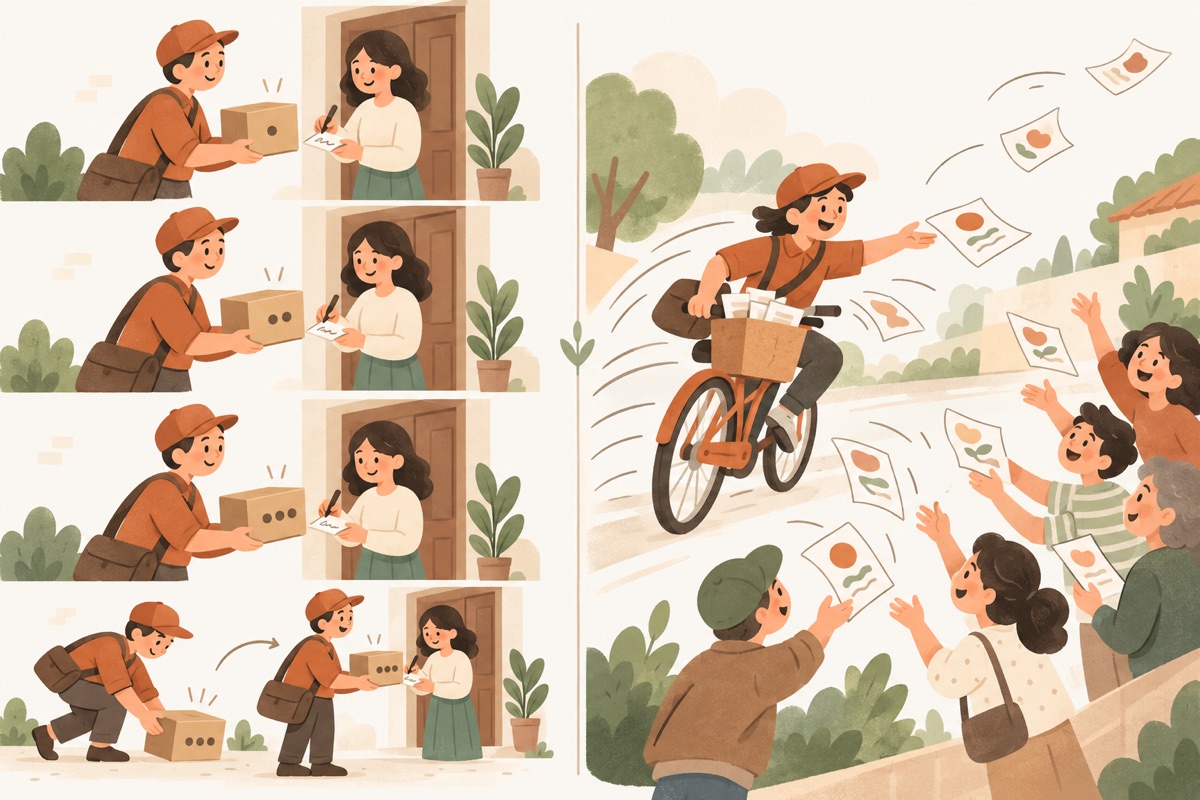
- ① TCP: numberedEvery segment is numbered and delivered in order
- ② TCP: signed forThe receiver replies with an acknowledgement (ACK)
- ③ TCP: resentA lost segment is sent again
- ④ UDP: just sendNo handshake, no waiting for ACKs — lower delay
- ⑤ UDP: lost is lostNothing is resent — fine for calls and games
The short version
| Protocol | Layer (TCP/IP) | What it does | Think of it as |
|---|---|---|---|
| IP | Internet | Addresses devices and forwards packets hop by hop | Street address + parcel sorting |
| TCP | Transport | Reliable, in-order delivery with retransmission | Registered mail — every item signed for |
| UDP | Transport | Just sends — no delivery or ordering guarantees, low delay | Handing out flyers |
| DNS | Application | Turns domain names into IP addresses | Phone book |
| HTTP / HTTPS | Application | Requests and returns web pages between browser and site | Ordering and serving food |
| TLS | Application (above TCP) | Encrypts the content and proves the site’s identity | A locked envelope |
| QUIC | Transport (over UDP) | Reliable transport with built-in encryption; the basis of HTTP/3 | Faster registered mail |
IP: an address for every device
IP (Internet Protocol) is the foundation of the internet. Every packet carries a source IP address and a destination IP address; routers along the way read only the destination and pass the packet one hop closer until it arrives.
- IPv4: 32 bits, written as four decimal numbers. About 4.3 billion addresses in total — all handed out years ago;
- IPv6: 128 bits, written as eight groups of hex digits. Practically unlimited, and spreading steadily;
- Private addresses and NAT: the phones and laptops on your home network use private addresses that only mean something locally (often starting with 192.168). When they go online, your router swaps them for the public address your ISP gave you — that’s NAT (network address translation).
IP only promises “best effort”. It doesn’t guarantee delivery or order — that’s left to the layer above.
TCP vs UDP: reliability or speed
The transport layer has two main characters. Both use port numbers to tell programs on the same machine apart, but they have very different personalities:
| TCP | UDP | |
|---|---|---|
| Connection | Handshake first | None — just send |
| Reliability | Every segment numbered and acknowledged; lost ones are resent | No acknowledgements, no resends — lost is lost |
| Ordering | Delivered to the program in the order sent | Not guaranteed |
| Speed | Handshakes and waiting for ACKs add delay | Little overhead, low latency |
| Typical uses | Web pages, downloads, email | Video calls, online games, live streams, DNS queries |
How does TCP stay reliable? Here’s one TCP connection from start to finish:
| Stage | Steps | What’s happening |
|---|---|---|
| Three-way handshake | ①–③ | Both sides confirm they can send and receive, and swap starting sequence numbers |
| Transfer | ④–⑤ | Every chunk of data is numbered; the receiver replies with an ACK saying “I have everything up to here” |
| Retransmission | ⑥–⑨ | Segment 2 is lost on the way. The sender never gets its ACK, times out and resends it automatically; the receiver then acknowledges it |
| Four-way close | ⑩–⑬ | Each side says “I’m done sending” and gets an acknowledgement before the connection fully closes. It takes four messages, not three, because one side may still have data to send when the other has finished |
This makes TCP very reliable, but there’s a cost: once a packet is lost, everything after it waits until the resend arrives — which is why poor connections feel so stuttery.
DNS: turning names into IP addresses
DNS is a worldwide, tiered phone book. No single server knows every name; the work is split by level:
- Root servers know who runs each top-level domain:
.com,.org,.ukand so on; - TLD servers — the
.comservers, say — know which server is in charge ofexample.com; - Authoritative servers, set up by the domain’s owner, hold the domain’s actual IP address.
Your device doesn’t make all those calls itself. It hands the question to a recursive resolver (usually run by your ISP or router), which does the legwork:
| Step | What’s happening |
|---|---|
| ① | Your device sends a single query to the resolver and waits |
| ② | The resolver checks its cache first; on a hit it jumps straight to ⑩ |
| ③–④ | It asks a root server, which doesn’t know the answer but says “ask the .com servers” |
| ⑤–⑥ | It asks a .com server and is pointed to example.com’s authoritative server |
| ⑦–⑧ | It asks the authoritative server and gets the real IP address |
| ⑨ | It caches the answer for the TTL the site set, so later lookups are instant |
| ⑩ | It sends the IP address back to your device |
By default, DNS queries travel over UDP, unencrypted — so networks along the way can see which names you look up, and can even return false answers. That’s why encrypted DNS (DoH, DoT) exists.
HTTP / HTTPS: the protocol for fetching pages
HTTP defines how the browser orders and the site serves: requests name a method (GET to fetch, POST to submit) and a path; responses carry a status code and the content. HTTPS is simply HTTP running inside a TLS-encrypted channel.
| Version | Runs over | Main improvement |
|---|---|---|
| HTTP/1.1 | TCP | One request at a time per connection, so busy pages queue up or open several connections |
| HTTP/2 | TCP | Many requests at once over one connection (multiplexing), compressed headers |
| HTTP/3 | QUIC (UDP) | No more “one lost packet stalls everything”, and faster connection setup |
TLS: encryption plus proof of identity
TLS sits above TCP and below HTTP, and does two jobs:
- Authentication: the site presents a certificate signed by a trusted authority, and the browser checks the name, expiry date and signature so you can’t be fooled by an impostor;
- Encryption: the two sides use a key exchange to arrive at a session key only they know, and encrypt everything after that with it.
Each step of the TLS handshake is shown in the full sequence diagram in What happens when you open a website?, so we won’t repeat it here.
QUIC: transport and encryption in one
QUIC was originally designed at Google and is now the foundation of HTTP/3. It runs over UDP, builds its own reliable delivery on top, and has TLS 1.3 built right in. The most visible benefit is faster connection setup:
| Before the first HTTP request | Why | |
|---|---|---|
| TCP + TLS 1.3 | 2 round trips (①–④) | The TCP handshake and then the TLS handshake happen one after the other |
| QUIC | 1 round trip (⑥–⑦) | Connection setup and encryption setup are combined into the same messages |
On a 200 ms international link, one fewer round trip means 0.2 seconds less waiting. QUIC has two more advantages:
- One lost packet doesn’t stall other requests: each request is its own independent “stream”, unlike TCP where a single loss holds up everything behind it;
- Switching networks doesn’t drop the connection: when your phone moves from Wi-Fi to mobile data, its IP address changes and TCP connections break — QUIC identifies connections by an ID and carries on seamlessly.
Related reading
FAQ
Why do games and video calls use UDP?
They care more about delay than about the odd lost packet. When TCP loses a packet it stops and waits for the resend, so video and audio freeze. UDP doesn't wait — losing a packet or two means a split-second glitch at most, and everything feels smoother overall.
What's the difference between IPv4 and IPv6?
Mainly address length. IPv4 uses 32 bits, about 4.3 billion addresses, which ran out long ago. IPv6 uses 128 bits — effectively inexhaustible. The two run side by side today, and many networks support both.
A site uses HTTP/3 — do I need to do anything?
No. Modern browsers negotiate HTTP/3 automatically with sites that support it and fall back to HTTP/2 or HTTP/1.1 when they don't.
Don't have Pangolin yet?
Available for iPhone / iPad, Mac, Windows and Android. New accounts get a free 7-day Pro trial.
Download the app